AWS Step Functions
Orchestrate multi-step AWS workflows — retries, branches, human-in-the-loop. AWS runs it; you declare it as JSON (or draw it in Workflow Studio).
Điều phối workflow AWS nhiều bước — retry, branch, có người can thiệp. AWS chạy; mình khai báo bằng JSON (hoặc vẽ trong Workflow Studio).
✓ When to reach for it✓ Khi nào dùng
- Long-running orchestration with retries or branches Workflow dài, có retry hoặc branch
- Multi-service coordination (Lambda + Batch + ECS + …) Phối nhiều service (Lambda + Batch + ECS + …)
- Human-in-the-loop or callback-driven flows Cần con người can thiệp hoặc callback từ ngoài
- Exactly-once guarantees on long-running flows Cần bảo đảm exactly-once trên workflow dài
✗ When not to✗ Khi nào KHÔNG dùng
- Simple queue → SQS Queue đơn giản → SQS
- Event routing · fan-out → EventBridge Route event · fan-out → EventBridge
- Pub/sub → SNS Pub/sub → SNS
- Trivial 2-step Lambda chain — just call it directly Chain 2 Lambda đơn giản — gọi thẳng, khỏi orchestrate
1 · Visual workflow 1 · Workflow trực quan
The diagram is the source of truth — colours light up as execution advances. Diagram chính là source of truth — màu sáng lên theo tiến trình chạy.
A polling workflow — submit, wait, poll for status, branch on complete / failed.
Workflow polling — submit, chờ, kiểm tra status, rẽ nhánh complete / failed.
2 · Standard vs Express 2 · Standard vs Express
Standard = durable, exactly-once, long. Express = fast, at-least-once, short. Standard = bền, exactly-once, dài. Express = nhanh, at-least-once, ngắn.
| Standard | Express | |
|---|---|---|
| Max durationThời lượng tối đa | 1 year1 năm | 5 minutes5 phút |
| Start rateTốc độ start | > 2,000 / sec> 2,000 / giây | > 100,000 / sec> 100,000 / giây |
| State transition rateTốc độ state transition | > 4,000 / sec per account> 4,000 / giây mỗi account | nearly unlimitedgần như không giới hạn |
| PricingCách tính phí | per state transition (pricier) theo state transition (đắt hơn) | per execution + duration + memory (cheaper) theo lần chạy + thời lượng + memory (rẻ hơn) |
| Execution historyLịch sử execution | Console visual debug · SFN API · CloudWatch Logs (optional) Debug visual · SFN API · CloudWatch Logs (tùy chọn) | CloudWatch Logs only (must opt-in) Chỉ CloudWatch Logs (phải bật) |
| SemanticsSemantic | exactly-once | at-least-once (async) · at-most-once (sync) |
3 · Integrations 3 · Tích hợp
Optimized = rich, service-aware. SDK = escape hatch to the other ~200 services. Optimized = tích hợp sâu, biết service. SDK = cửa thoát hiểm sang ~200 service còn lại.
Optimized integrations (solid) vs SDK escape hatch (dashed).
Optimized (nét liền) vs cửa thoát hiểm SDK (nét đứt).
4 · Workflow triggers 4 · Trigger workflow
8 surfaces can start a state machine. Two SDK entrypoints — StartExecution · start-execution.
8 nơi có thể start state machine. Hai entrypoint SDK — StartExecution · start-execution.
Console
click Start execution
AWS SDK
StartExecution API
AWS CLI
aws stepfunctions start-execution
Lambda
call StartExecution in handler
gọi StartExecution trong handler
API Gateway
REST → SFN integration
REST → tích hợp SFN
EventBridge
rule target = state machine
CodePipeline
action = invoke workflow
Nested Step FunctionStep Function lồng
state machine → state machine
5 · State types 5 · Loại State
8 built-in ASL state types. Task = do work. The other 7 are flow control. 8 loại state trong ASL. Task = làm việc. 7 loại còn lại là điều khiển flow.
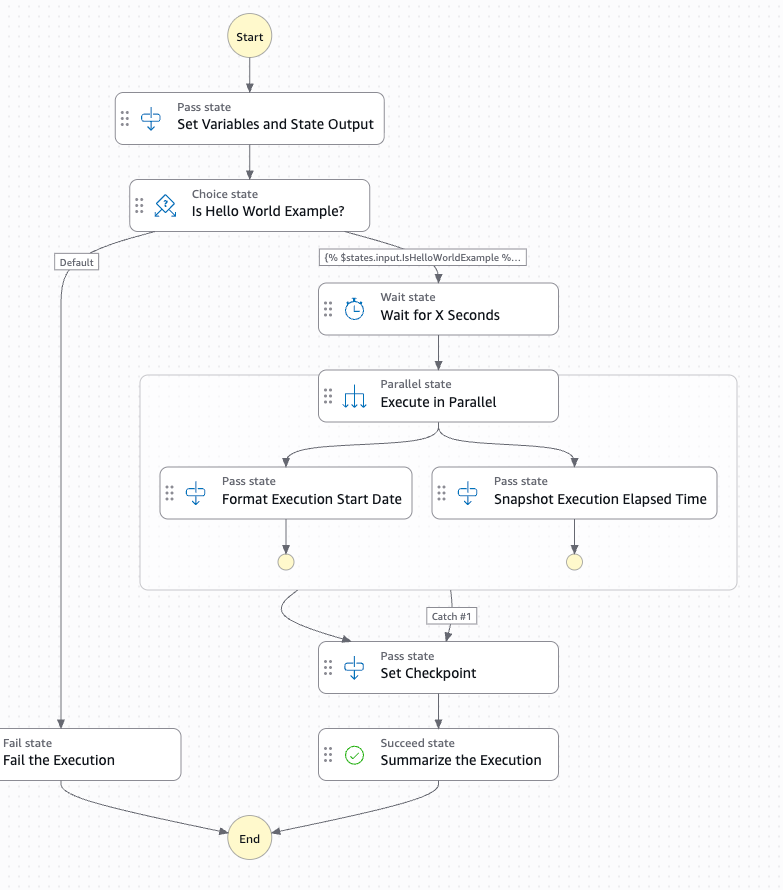
Workflow Studio · HelloWorldStateMachine — one state machine touching 6 of the 8 state types.
Workflow Studio · HelloWorldStateMachine — 1 state machine dùng 6 trong 8 loại state.
State machine skeleton Khung state machine
{
  "Comment":       "...",
  "QueryLanguage": "JSONata",
  "StartAt":       "First State",
  "States": {
    "First State": {
      "Type": "Pass",
      "Next": "..."
    }
  }
}{% $states.input.field %}. Alternative to the classic JSONPath ($.field). Set at machine or per-state level via QueryLanguage.
Ngôn ngữ biểu thức mới cho input / output của state. Cú pháp: {% $states.input.field %}. Thay thế cho JSONPath cũ ($.field). Set ở cấp machine hoặc từng state qua QueryLanguage.
The 8 types 8 loại
| TypeType | What it doesChức năng |
|---|---|
| Task | Do actual work — invoke Lambda / Batch / ECS / DynamoDB / SDK. Nơi thực sự làm việc — gọi Lambda / Batch / ECS / DynamoDB / SDK. |
| Pass | Transform or inject data. No external work — good for reshaping input or seeding variables. Transform hoặc inject data. Không gọi ngoài — hay dùng để reshape input hoặc set biến. |
| Choice | if / then / else branching on the state input. Rẽ nhánh if / then / else theo input. |
| Wait | Pause for a duration or until a timestamp. Free in Standard while idle. Dừng theo thời lượng hoặc timestamp. Miễn phí trong Standard khi chờ. |
| Succeed | Terminate the machine with success. No transitions out. Kết thúc machine với success. Không có transition ra. |
| Fail |
Terminate with failure. Optional Error + Cause.
Kết thúc với failure. Có thể set Error + Cause.
|
| Parallel | Fan out to N independent branches, wait for all to finish, join results. Fan-out N nhánh độc lập, chờ hết rồi join kết quả. |
| Map | For each item in a list, run a sub-workflow — parallel by default. Mỗi item trong list → chạy sub-workflow, mặc định song song. |
Task variants — 3 flavours Task có 3 loại
Every Task is one of these — chosen by how it reaches the work:
Mỗi Task là một trong ba — phân theo cách gọi tới compute:
Lambda task
Invoke a Lambda function. The most common. Sync by default.
Gọi Lambda function. Hay dùng nhất. Sync mặc định.
Activity task
Long-running worker (HTTP · EC2 · mobile · on-prem) that polls SFN. For legacy code or non-AWS compute.
Worker chạy lâu (HTTP · EC2 · mobile · on-prem) poll SFN. Dùng cho code cũ hoặc compute ngoài AWS.
Service task
Direct call to a supported AWS service — Lambda, ECS, Fargate, DynamoDB, Batch, SNS, SQS.
Gọi thẳng service AWS được hỗ trợ — Lambda, ECS, Fargate, DynamoDB, Batch, SNS, SQS.
.sync — waits for Batch/ECS/Glue job to finish) · Callback (.waitForTaskToken — pauses until something calls SendTaskSuccess/SendTaskFailure with the token). Standard only — Express supports neither .sync nor callbacks.
Ba pattern gọi: fire-and-forget (mặc định) · Run a Job (.sync — chờ job Batch/ECS/Glue chạy xong) · Callback (.waitForTaskToken — dừng đến khi có gì đó gọi SendTaskSuccess/SendTaskFailure kèm token). Chỉ Standard — Express không hỗ trợ .sync lẫn callback.
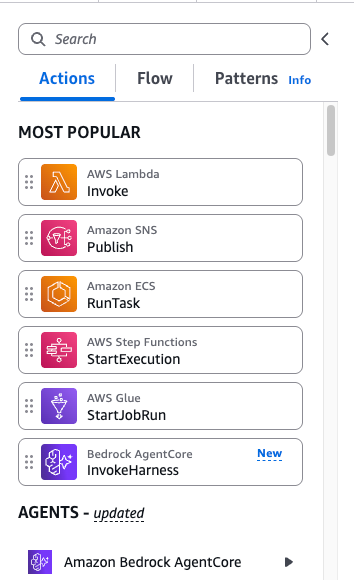
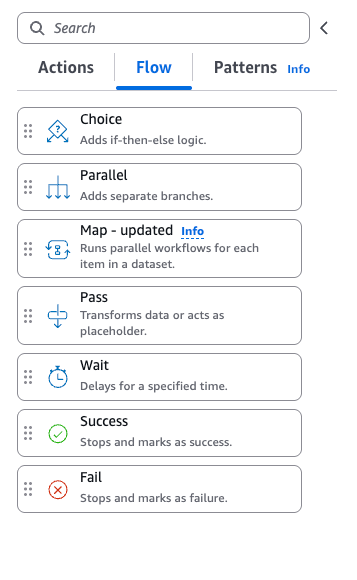
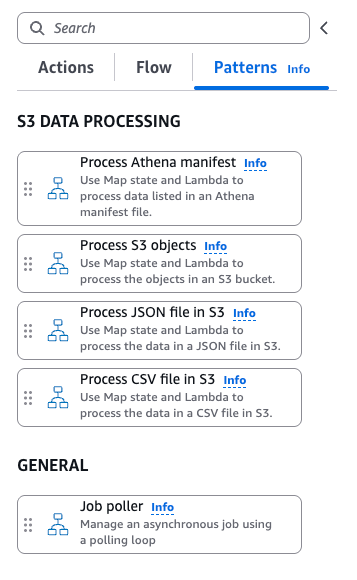
Where they live in Workflow Studio Nằm ở đâu trong Workflow Studio
6 · Express · sync vs async 6 · Express · sync vs async
Sync = blocks + returns result. Async = only ack's the start. Sync = chờ + trả kết quả. Async = chỉ ack là đã start.
Sync — caller waits for the result Sync — caller chờ kết quả
API Gateway response returns the workflow output. Fits: microservice orchestration, request/response.
API Gateway trả về output của workflow. Hợp cho: điều phối microservice, request/response.
Async — fire and continue Async — bắn đi và làm tiếp
Client gets an immediate ack; workflow runs on. Fits: messaging, notifications, background tasks.
Client nhận ack ngay, workflow chạy tiếp. Hợp cho: messaging, notification, background.
7 · Error handling & alerting 7 · Xử lý lỗi & alert
Retry + Catch live in the state definition. Alert via EventBridge → SNS.
Retry + Catch khai báo trong state. Alert qua EventBridge → SNS.
Retry block — declared in JSON Retry block — khai báo trong JSON
{
  "Retry": [
    {
      "ErrorEquals":     ["States.ALL"],
      "IntervalSeconds": 3,
      "MaxAttempts":     2,
      "BackoffRate":     1.5
    }
  ]
}
Meaning: on any error, wait 3 s, retry — up to 2 more attempts. Each next wait × 1.5 (exponential backoff).
Nghĩa là: gặp lỗi bất kỳ, chờ 3 giây rồi retry — tối đa 2 lần thêm. Mỗi lần chờ nhân 1.5 (exponential backoff).
Alerting flow — email on execution failure Luồng alert — email khi execution fail
Failure events land on EventBridge; a rule fans them out to SNS → email / Slack / …
Event failure vào EventBridge; rule fan-out sang SNS → email / Slack / …
8 · Worked example · DynamoDB → SQS loop 8 · Ví dụ · loop DynamoDB → SQS
3 triggers → SFN → internal loop reads DynamoDB, pushes SQS. 3 trigger → SFN → loop nội bộ đọc DynamoDB, đẩy SQS.
Three trigger sources → one state machine → an internal loop that reads DynamoDB and pushes to SQS.
3 nguồn trigger → 1 state machine → loop nội bộ đọc DynamoDB và đẩy sang SQS.
9 · Traps I fall for 9 · Bẫy hay dính
- 01 No Mechanical Turk. Reach for Activity task or the callback pattern. Không có Mechanical Turk. Dùng Activity task hoặc callback pattern.
- 02 Sync ≠ Async Express. Sync blocks + returns result. Async only ack's. Sync ≠ Async Express. Sync chờ + trả kết quả. Async chỉ ack.
- 03 Standard = exactly-once + pricier. Express = at-least-once + cheap. Don't pick by name — pick by semantic. Standard = exactly-once + đắt. Express = at-least-once + rẻ. Đừng chọn theo tên — chọn theo semantic.
- 04 Express requires opt-in to CloudWatch Logs. Not enabled → no execution history at all. Express phải bật CloudWatch Logs. Không bật → không có lịch sử execution nào.
- 05 Wait tasks are free in Standard while idle. Cheap way to schedule long delays. Wait task miễn phí trong Standard khi đang chờ. Cách rẻ để schedule delay lâu.
- 06 State transitions cost money in Standard. More states = higher bill. Optimize the graph, not just the code. State transition tốn tiền trong Standard. Càng nhiều state → càng đắt. Tối ưu graph, không chỉ code.
-
07
ErrorEquals: ["States.ALL"]catches everything. Prefer specific errors when you can; chain multiple Retry blocks.ErrorEquals: ["States.ALL"]bắt mọi lỗi. Ưu tiên error cụ thể; có thể chain nhiều Retry block. - 08 Trigger surfaces to remember: Console · SDK · CLI · Lambda · API Gateway · EventBridge · CodePipeline · nested SF. Nhớ các nơi trigger được: Console · SDK · CLI · Lambda · API Gateway · EventBridge · CodePipeline · nested SF.
- 09 256 KiB max input/output per state (hard). Pass large data as an S3 reference, not the payload itself. Tối đa 256 KiB input/output mỗi state (cứng). Data lớn thì truyền reference S3, đừng nhét payload.
- 10 Standard history caps at 25,000 events — long loops die. Fix: Distributed Map, or split into a new execution (continue-as-new). History của Standard cap 25,000 event — loop dài sẽ chết. Cách xử lý: Distributed Map, hoặc tách sang execution mới (continue-as-new).
- 11 Redrive: a failed Standard execution can restart from the failed state (within 14 days) — no need to re-run the whole workflow. Redrive: Standard execution fail có thể chạy lại từ state bị fail (trong 14 ngày) — không cần chạy lại cả workflow.